
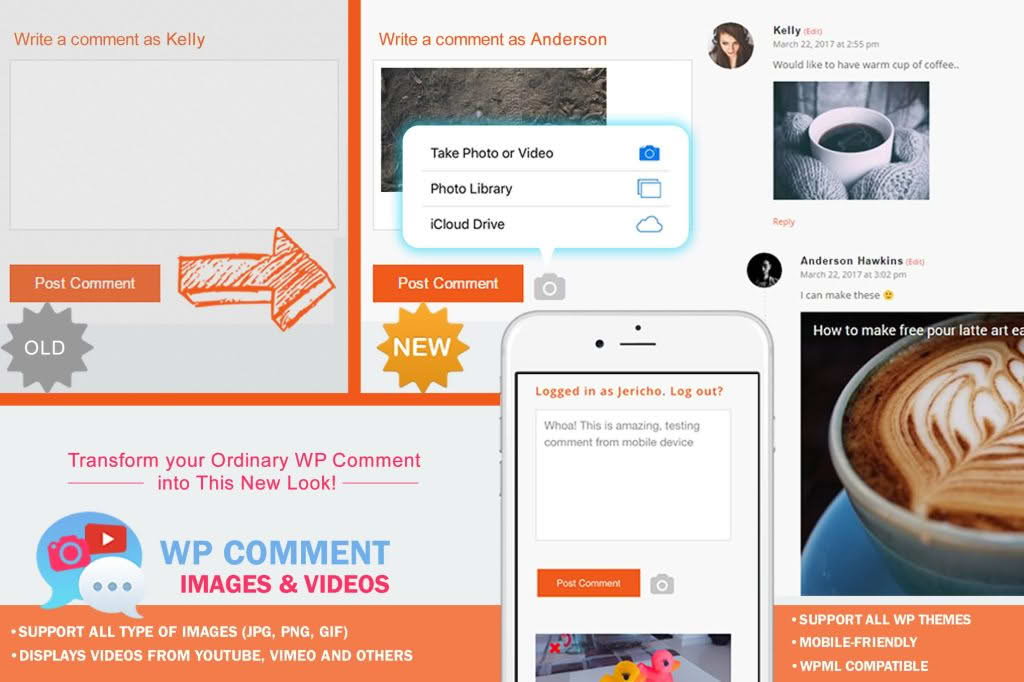
Transform your standard WordPress comment section into a dynamic, visual conversation hub with the WP Comment Images and Videos plugin. By allowing your visitors to attach images and videos directly to their comments, you bridge the gap between static text and engaging, multimedia-rich discussions. This plugin is the perfect solution for site owners, bloggers, and community builders who want to increase user interaction, foster deeper connections, and provide their audience with the tools they need to express themselves more effectively.
Key Features
- Multimedia Support: Empower users to upload images and embed videos directly within the comment form, making discussions more visual and engaging.
- Flexible File Control: Maintain full control over your site’s performance and security by configuring allowed file types, maximum upload sizes, and dimensions for images and videos.
- Spam and Security Protection: Integrate seamlessly with existing security measures to ensure that uploaded content is safe, moderated, and free from malicious files.
- Lightweight Performance: Designed with site speed in mind, the plugin ensures that loading media-rich comments does not negatively impact your page load times.
- Responsive Design: Ensure that your comment section looks and functions perfectly on all devices, from desktop computers to smartphones and tablets.
- User-Friendly Interface: Provide a seamless experience for your visitors with an intuitive upload button integrated directly into the standard WordPress comment form.
- Moderation Ready: All media attachments are subject to your existing comment moderation settings, giving you final approval over what appears on your site.
Use Cases / Who It’s For
This plugin is an essential tool for any WordPress site owner looking to cultivate a more active and loyal community. If you run a photography blog, your readers can finally share their own shots in response to your posts, creating a collaborative gallery. For e-commerce store owners, allowing customers to post photos of their purchases in the comments provides valuable social proof that can significantly boost conversion rates.
Educational sites and tutorial blogs also benefit immensely, as students and readers can upload screenshots to ask specific questions or demonstrate their progress. By removing the barrier of text-only communication, you encourage more frequent participation, increase the time visitors spend on your site, and build a more vibrant, interactive brand identity.
Setup / How It Works
- Installation: Install and activate the plugin through your WordPress dashboard just as you would with any standard plugin.
- Configuration: Navigate to the plugin settings page to define your preferences. Here, you can specify which file formats (such as JPG, PNG, or MP4) are permitted and set the maximum file size to prevent large uploads from consuming your server storage.
- Integration: The plugin automatically hooks into the default WordPress comment form. No coding or manual template editing is required.
- User Experience: Once configured, your visitors will see an upload icon or button within the comment section. They simply select their file, add their comment text, and submit.
- Moderation: As an administrator, you can view, approve, or delete comments with media attachments directly from the standard WordPress Comments management screen, ensuring your site remains professional and on-brand.
Similar Plugins
While WP Comment Images and Videos offers a streamlined approach to media-enabled comments, other solutions exist in the WordPress ecosystem that provide similar functionality. Plugins like Comment Images and Comment Attachment are also widely used for enabling media uploads in comments. Additionally, some comprehensive comment management systems, such as wpDiscuz, include built-in media attachment features as part of a broader suite of enhanced commenting tools. We recommend reviewing these options to determine which best fits your specific site architecture and community engagement goals.