
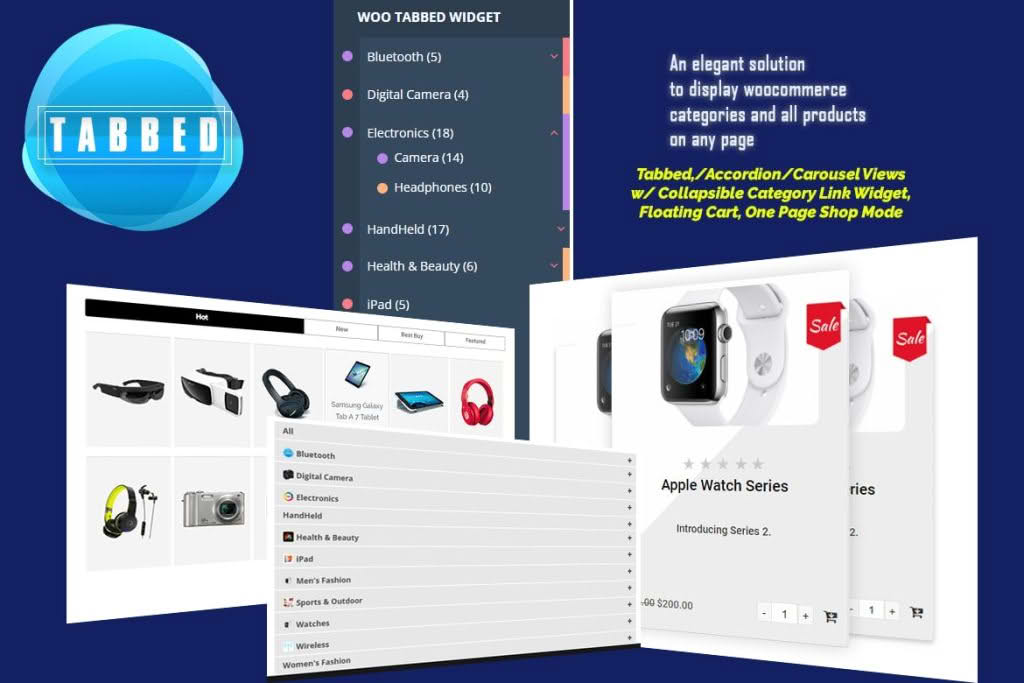
Transform your online store’s navigation and boost conversions with the WooCommerce Tabbed Category Product Listing plugin. Designed for store owners who want to declutter their homepage or landing pages, this tool allows you to showcase multiple product categories within a clean, interactive tabbed interface. Instead of overwhelming your customers with endless scrolling or cluttered grids, you can provide a streamlined shopping experience where users can effortlessly switch between categories to find exactly what they are looking for.
Key Features
- Dynamic Tabbed Interface: Display products from different categories in a sleek, tabbed layout that keeps your page organized and visually appealing.
- Shortcode Integration: Easily embed your tabbed product listings anywhere on your site, including pages, posts, or custom widget areas, using simple shortcodes.
- Customizable Product Display: Control how many products appear per tab and choose the specific categories you want to highlight to drive sales toward your best-sellers or new arrivals.
- Responsive Design: Ensure a seamless shopping experience across all devices, from desktop computers to smartphones and tablets, with a layout that automatically adapts to screen size.
- AJAX Loading: Improve page load times and user experience with efficient content loading, ensuring that customers don’t have to reload the entire page to view a different category.
- Flexible Configuration: Tailor the look and feel of your tabs to match your brand identity with intuitive settings that require no complex coding or development knowledge.
Use Cases / Who It’s For
This plugin is an essential asset for any WooCommerce store owner aiming to improve site architecture and user engagement. If you manage a large inventory with diverse product lines, such as a fashion boutique, an electronics retailer, or a home goods store, this plugin helps you segment your offerings logically. By grouping related items into tabs, you reduce the cognitive load on your visitors, making it easier for them to compare items and make purchasing decisions.
It is also perfect for marketers and store managers who utilize landing pages for specific campaigns. Instead of sending traffic to a generic shop page, you can create a focused landing page that highlights a specific collection, while still providing quick access to other relevant categories via tabs. This keeps users on your site longer and reduces bounce rates by providing relevant content immediately upon arrival.
Setup / How It Works
- Install and Activate: Upload the plugin to your WordPress dashboard via the Plugins menu and activate it to begin the configuration.
- Configure Settings: Navigate to the plugin settings page to define your default display preferences, such as the number of products per tab and the order of categories.
- Select Categories: Choose the specific product categories you wish to include in your tabbed display.
- Generate Shortcode: Use the provided shortcode generator to create a unique tag for your specific configuration.
- Embed and Publish: Paste the generated shortcode onto any page, post, or widget area where you want the tabbed product listing to appear, and save your changes.
Similar Plugins
If you are exploring different ways to organize your WooCommerce store, you may also encounter alternative solutions designed to enhance product visibility. Plugins such as WooCommerce Product Carousel, WooCommerce Category Accordion, and various WooCommerce Product Grid/Filter plugins offer different approaches to navigation. While these alternatives focus on sliders, collapsible menus, or advanced filtering, the Tabbed Category Product Listing plugin remains the premier choice for users who prioritize a clean, tab-based layout to categorize their store inventory effectively.