
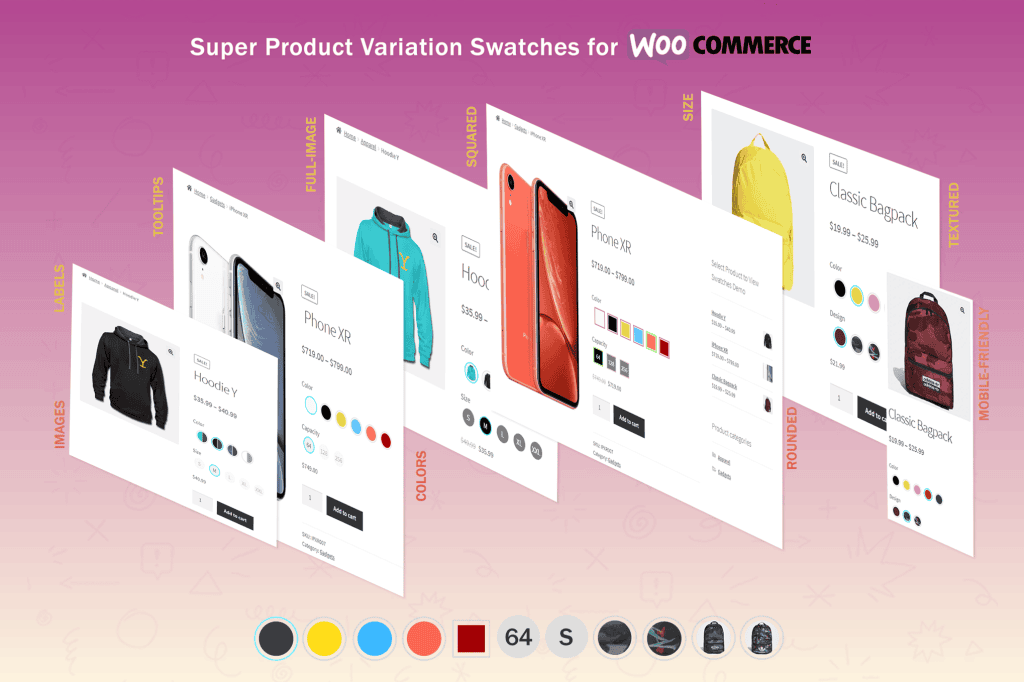
Transform your WooCommerce store from a standard, text-heavy product page into a visually engaging, user-friendly shopping experience with Super Product Variation Swatches for WooCommerce. By replacing boring, default dropdown menus with intuitive, clickable swatches, this plugin helps your customers visualize their options—like colors, patterns, sizes, and materials—instantly. When shoppers can see exactly what they are buying without clicking through multiple menus, you reduce friction, improve user experience, and significantly increase your conversion rates.
Key Features
- Visual Variation Selection: Replace standard dropdowns with beautiful color, image, or label swatches, making it effortless for customers to select their preferred product attributes.
- Customizable Swatch Shapes: Choose between square, rounded, or circular swatch styles to perfectly match your website’s unique design aesthetic and branding.
- Global and Product-Level Control: Configure your swatch settings globally across your entire store or override them on a per-product basis for maximum flexibility.
- Out-of-Stock Indicators: Clearly communicate availability by automatically crossing out or hiding out-of-stock variations, preventing customer frustration during the checkout process.
- Tooltip Support: Enhance usability by displaying custom tooltips when a user hovers over a swatch, providing extra details like color names or size guides.
- Mobile-Responsive Design: Ensure your product pages look and function perfectly on all devices, providing a seamless shopping experience for mobile, tablet, and desktop users.
- Fast Performance: Built with clean, optimized code to ensure that your product pages load quickly, keeping your site fast and SEO-friendly.
Use Cases and Who It’s For
Super Product Variation Swatches is an essential tool for any WooCommerce store owner selling products with multiple attributes. If you run a fashion or apparel store, you can use color swatches to show the exact fabric patterns or shades available, helping customers visualize their purchase immediately. For home goods, furniture, or electronics retailers, the plugin allows you to display material textures or technical specifications clearly, reducing the number of questions your support team receives.
This plugin is perfect for store owners who want to modernize their user interface without requiring complex coding knowledge. Whether you are a small boutique owner looking to improve your brand presentation or a high-volume retailer aiming to reduce cart abandonment, this plugin provides the visual clarity needed to guide shoppers toward the “Add to Cart” button faster.
Setup and How It Works
- Install and Activate: Upload the plugin to your WordPress dashboard via the Plugins menu and activate it to begin the configuration process.
- Define Attributes: Navigate to the WooCommerce Products > Attributes section to create your attributes (e.g., Color, Size) and assign them the appropriate swatch type (Color, Image, or Label).
- Configure Global Settings: Use the plugin’s settings panel to set your default swatch shape, size, and tooltip preferences that will apply to your store.
- Apply to Products: Add your variations to your individual products as you normally would in WooCommerce. The plugin will automatically detect these variations and render them as swatches based on your configured settings.
- Preview and Publish: Visit your product pages to see your new, interactive swatches in action and make any minor adjustments to the styling as needed.
Similar Plugins
If you are exploring your options, other popular solutions in the WooCommerce ecosystem that offer similar functionality include Variation Swatches for WooCommerce by GetWooPlugins, Product Variation Swatches for WooCommerce by ThemeHigh, and Variation Swatches for WooCommerce by CartFlows. Each of these plugins serves a similar purpose in enhancing the visual representation of product variations, though they may differ in their specific feature sets, interface designs, and customization options.