
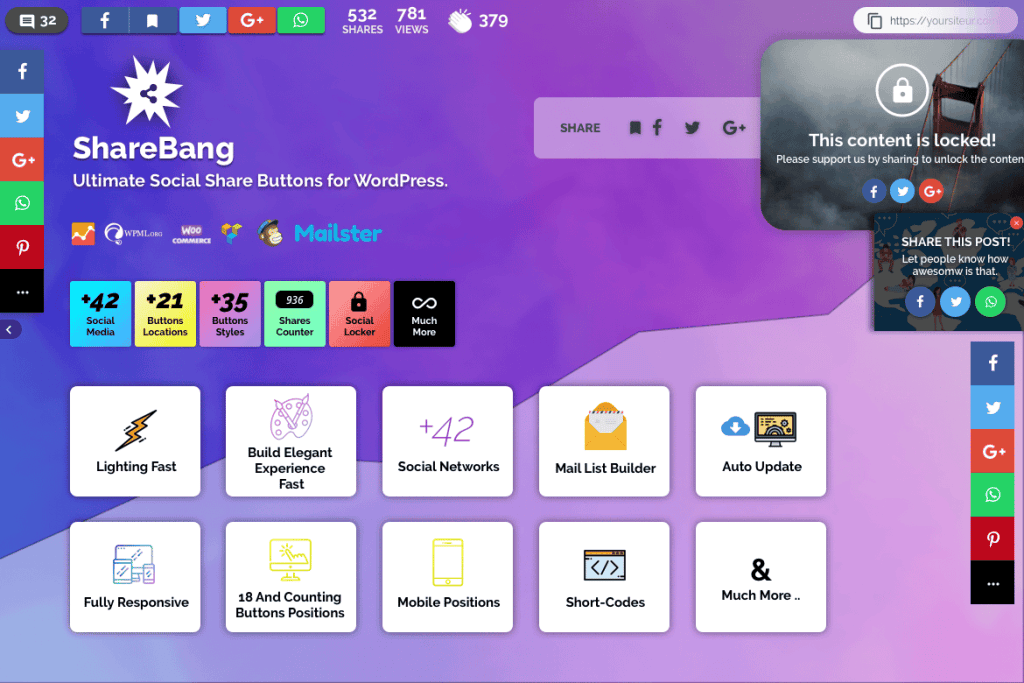
In today’s digital landscape, your content is only as powerful as the audience it reaches. ShareBang, Ultimate Social Share Buttons for WP, is designed to turn your passive website visitors into active brand ambassadors. By providing a seamless, high-performance social sharing experience, this plugin helps you amplify your reach, increase traffic, and boost engagement across all major social media platforms without slowing down your site.
Key Features
- Extensive Social Network Support: Connect your site to over 40 major social networks and messaging apps, ensuring your content can be shared exactly where your audience spends their time.
- Optimized Performance: Engineered for speed, ShareBang ensures that adding social functionality doesn’t negatively impact your page load times, keeping both your users and search engines happy.
- Versatile Display Positions: Choose from a wide variety of display locations, including floating bars, inline buttons, pop-ups, and sticky footers, allowing you to place calls to action exactly where they convert best.
- Mobile-Responsive Design: Your share buttons will look and function perfectly across all devices, from desktop computers to smartphones and tablets, ensuring a consistent user experience.
- Advanced Customization: Tailor the look and feel of your buttons to match your brand identity with multiple button styles, shapes, colors, and animation effects.
- Social Proof Integration: Display share counts to build credibility and encourage more users to join the conversation, leveraging the power of social validation.
- Analytics Dashboard: Gain valuable insights into how your content is being shared with a built-in tracking system that monitors clicks and performance trends.
- Sticky Share Buttons: Keep your sharing options visible at all times as users scroll through your content, significantly increasing the likelihood of engagement.
Use Cases and Who It’s For
ShareBang is an essential tool for any WordPress user looking to grow their digital footprint. If you are a content creator or blogger, ShareBang makes it effortless for your readers to distribute your articles to their own networks, driving organic traffic back to your site. For e-commerce store owners, the plugin serves as a powerful marketing engine; when customers share your product pages, they provide authentic recommendations that can lead to higher conversion rates and increased sales.
Digital marketers and agencies will appreciate the plugin’s flexibility and ease of deployment across multiple client sites. Whether you are running a news portal, a portfolio site, or a corporate blog, ShareBang provides the necessary infrastructure to turn your readership into a viral engine, helping you build a loyal community around your brand.
Setup and How It Works
Getting started with ShareBang is designed to be straightforward, requiring no coding knowledge to achieve a professional result:
- Installation: Upload and activate the plugin via your WordPress dashboard just like any other standard plugin.
- Configuration: Navigate to the ShareBang settings panel to select your preferred social networks and choose the button styles that best align with your website’s design.
- Placement: Use the intuitive settings to determine where your buttons should appear—such as before or after content, on specific post types, or as a floating element.
- Refinement: Utilize the customization options to tweak colors, sizes, and animations to ensure a seamless visual integration with your theme.
- Launch: Save your settings, and your social sharing buttons will immediately go live, ready to capture engagement from your visitors.
Similar Plugins
If you are exploring the social sharing landscape, other notable solutions in the WordPress ecosystem include:
- Social Snap: Known for its comprehensive feature set and balance between performance and advanced customization options.
- Shared Counts: A lightweight, developer-friendly option that focuses heavily on fast performance and accurate share count retrieval.
- AddToAny Share Buttons: A long-standing, widely used plugin that offers a massive range of service integrations and simple configuration tools.