
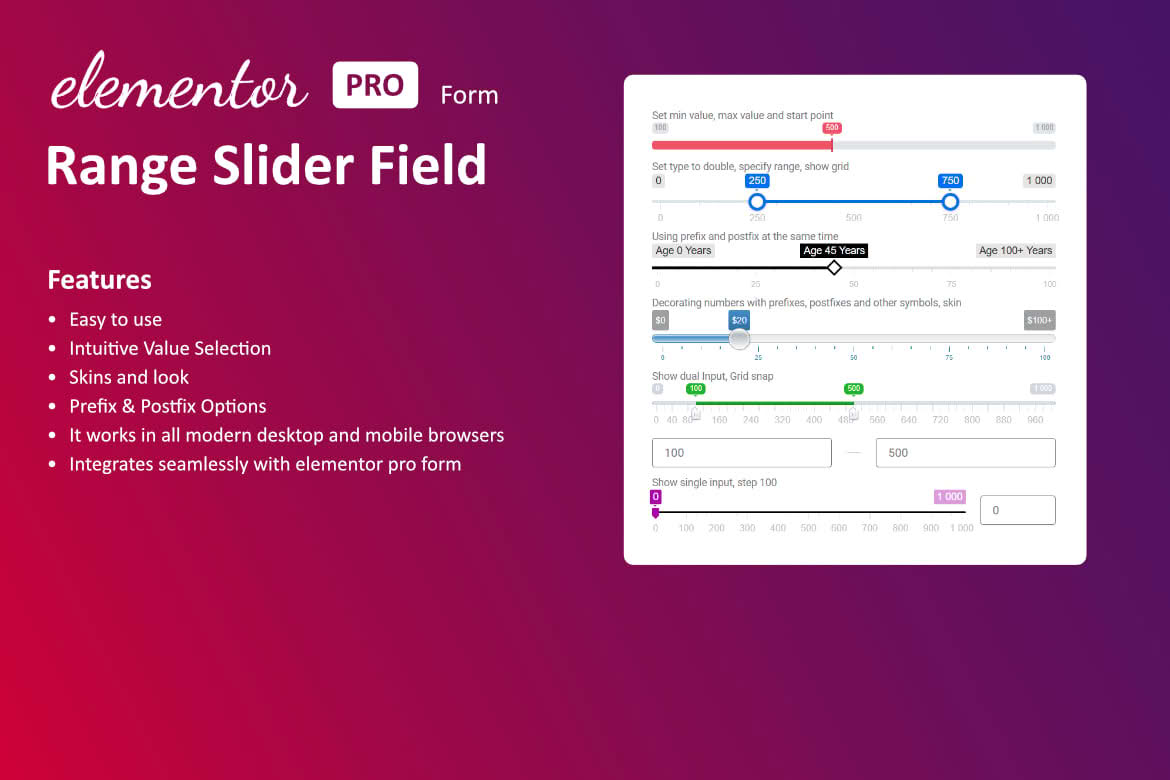
Transform your Elementor forms from static data collection tools into interactive, engaging experiences with the Range Slider Field for Elementor. This essential add-on bridges the gap between basic form inputs and modern, user-friendly interface design by allowing you to add a sleek, interactive range slider directly into your Elementor forms. Whether you are building complex calculators, gathering customer feedback, or creating custom quote requests, this plugin empowers you to capture precise numerical data while significantly improving the user experience on your website.
Key Features
- Seamless Elementor Integration: Designed specifically for the Elementor ecosystem, this field appears directly within your form editor, allowing for a native “drag-and-drop” workflow without needing custom code.
- Fully Customizable Appearance: Match your brand identity perfectly by adjusting slider colors, handle styles, track thickness, and overall dimensions to ensure the field blends naturally with your existing form design.
- Dynamic Value Display: Provide instant feedback to your users with real-time value updates. You can choose to display the selected number above the slider, beside it, or hide it entirely depending on your design requirements.
- Precise Control Settings: Define your minimum and maximum values, set specific step intervals (e.g., increments of 5 or 10), and establish a default starting position to guide your users toward the desired input range.
- Responsive Design: Built with mobile-first principles in mind, the range slider is touch-friendly and scales perfectly across all devices, ensuring a consistent experience for desktop and mobile users alike.
- Data Compatibility: Captured slider values are seamlessly integrated into your form submissions, making them easily accessible in your email notifications, database logs, and third-party CRM integrations.
Use Cases / Who It’s For
The Range Slider Field is an indispensable tool for any website owner, marketer, or developer looking to enhance form conversion rates and data accuracy. If your form requires users to select a number, a range slider is almost always superior to a standard text input field because it prevents manual entry errors and makes the selection process intuitive and fun.
For service-based businesses, this plugin is perfect for building “Get a Quote” calculators. Allow potential clients to slide to their desired service volume, budget range, or project timeline, providing them with an immediate sense of control. E-commerce store owners can utilize the slider for customer feedback forms, such as rating satisfaction levels or prioritizing product features. Additionally, it is an excellent choice for lead generation forms where you need to qualify prospects based on their budget or timeline, as the interactive nature of the slider encourages higher completion rates compared to tedious dropdown menus or text fields.
Setup / How It Works
Getting started with the Range Slider Field is designed to be straightforward, requiring no technical expertise or custom development.
- Install and Activate: Once you have installed the plugin, it will automatically register a new field type within your Elementor form widget.
- Add the Field: Open your Elementor editor, navigate to your form widget, and click to add a new item. Select “Range Slider” from the field type dropdown menu.
- Configure Settings: Use the field settings panel to define your range parameters, such as the minimum value, maximum value, and step increments.
- Style Your Slider: Switch to the Style tab in Elementor to customize the colors, handle size, and typography of the value display to match your site’s aesthetic.
- Save and Publish: Once configured, save your form. The slider will immediately appear on your live site, ready to collect interactive data from your visitors.
Similar Plugins
While the Range Slider Field for Elementor is a specialized solution, other options exist within the WordPress ecosystem for those looking to add slider functionality to forms. These include various “Elementor Addon” packs that bundle a range slider alongside other form widgets, as well as dedicated form-builder-specific extensions for popular platforms like WPForms or Gravity Forms. Users should evaluate whether they need a standalone, lightweight solution or a comprehensive suite of form widgets before selecting the best tool for their specific project requirements.