
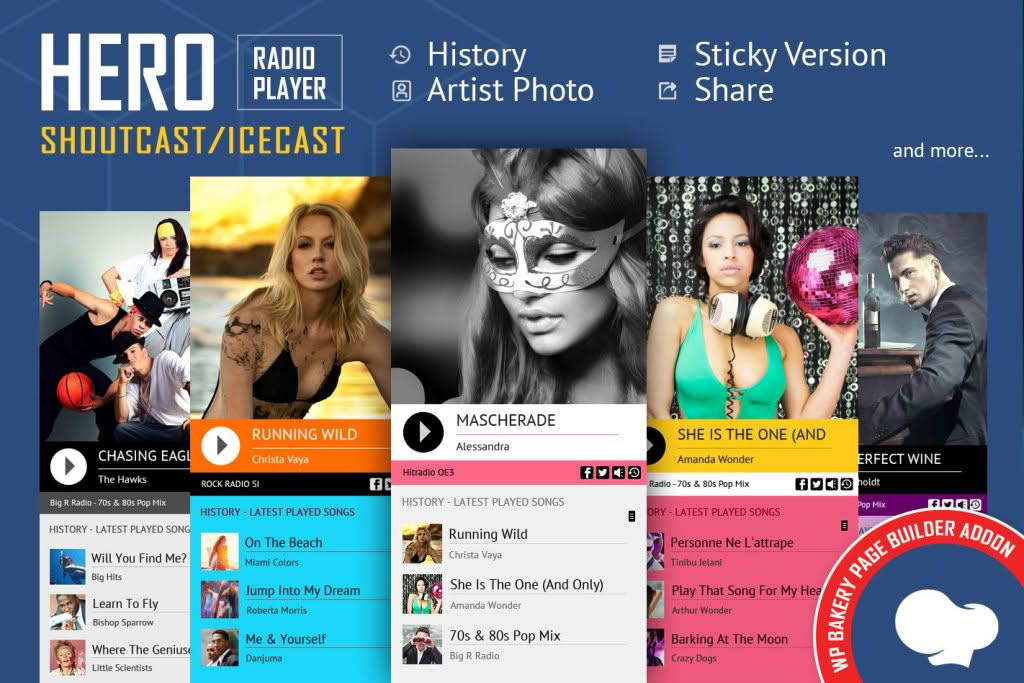
Transform your WordPress website into a professional broadcasting hub with the Hero ShoutCast/IceCast Radio Player WPBakery Addon. This powerful extension seamlessly bridges the gap between your live audio streams and your website visitors, allowing you to embed a fully functional, highly customizable radio player directly into any page or post. Designed specifically for integration with the WPBakery Page Builder, this plugin ensures that webmasters, radio station managers, and content creators can deploy a sleek, responsive audio interface without writing a single line of code.
Key Features
- Seamless WPBakery Integration: Drag and drop the player element anywhere on your site using the familiar WPBakery interface, ensuring a smooth workflow for both beginners and experienced developers.
- ShoutCast and IceCast Compatibility: Effortlessly connect to your existing streaming servers. The plugin is built to handle standard ShoutCast and IceCast stream URLs, ensuring reliable playback for your listeners.
- Responsive Design: Your radio player will look and perform perfectly on all devices, from desktop computers to tablets and smartphones, providing a consistent listening experience regardless of screen size.
- Real-Time Metadata Display: Keep your audience engaged by automatically pulling and displaying current track information, artist names, and song titles directly from your stream metadata.
- Customizable Interface: Tailor the player to match your brand identity. Adjust colors, button styles, and layout settings to ensure the player feels like an organic part of your website design.
- Volume Control and Mute: Provide users with intuitive playback controls, including easy-to-use volume adjustment and mute functionality for a user-friendly experience.
- Auto-Play Options: Choose whether your stream starts automatically when a visitor lands on the page or waits for the user to initiate playback, giving you control over the listener’s journey.
Use Cases / Who It’s For
This addon is the ideal solution for anyone looking to broadcast live audio content through a WordPress platform. It is particularly well-suited for independent internet radio stations that need a reliable way to showcase their live programming to a global audience. By embedding the player, station managers can keep listeners on their website longer, increasing engagement and providing a central hub for show schedules, DJ bios, and social media interaction.
Beyond traditional radio, this plugin is an excellent tool for podcasters who host live, recurring broadcasts, as well as churches and religious organizations that stream live services or sermons. Event organizers can also utilize the player to broadcast live commentary from conferences, music festivals, or sporting events directly to their event landing pages. If your goal is to deliver live audio content with a professional, polished aesthetic, this plugin provides the necessary infrastructure to make it happen without technical overhead.
Setup / How It Works
- Installation: Install and activate the plugin through your WordPress dashboard just like any other standard plugin.
- Access the Element: Open the WPBakery Page Builder on the page where you wish to display your radio player.
- Add the Element: Locate the ‘Hero ShoutCast/IceCast Radio Player’ element in the WPBakery element library and add it to your row or column.
- Configure Settings: Enter your stream URL (ShoutCast or IceCast) into the settings window. From here, you can also toggle features like auto-play, adjust the visual styling, and set the initial volume levels.
- Save and Publish: Once you have configured your preferences, save your changes and publish the page. Your live stream will immediately be accessible to your website visitors.