
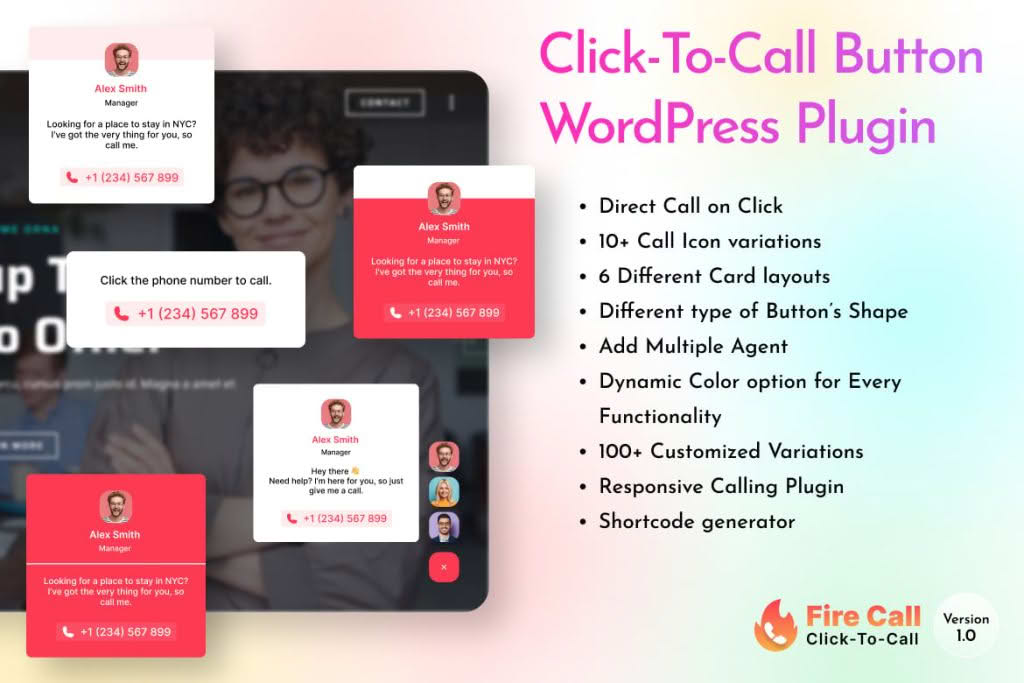
In today’s fast-paced digital landscape, every second counts when a potential customer decides to reach out. The Fire Call – WordPress Click-To-Call Button Plugin bridges the gap between your website visitors and your sales or support team by placing an intuitive, highly visible call button directly on your site. By removing the friction of copying and pasting phone numbers or navigating through complex contact forms, this plugin empowers your visitors to connect with you instantly, significantly increasing conversion rates and improving customer satisfaction.
Key Features
- Instant Connectivity: Enables visitors to initiate a phone call with a single tap, making it effortless for mobile users to reach your business immediately.
- Customizable Design: Tailor the appearance of your call button to match your brand identity, ensuring it looks like a natural, professional part of your website rather than an intrusive add-on.
- Strategic Placement Options: Choose exactly where the button appears on your pages, allowing you to position it for maximum visibility without obscuring critical content.
- Mobile-Responsive Performance: Engineered specifically for the mobile experience, ensuring the button functions flawlessly across smartphones and tablets where the majority of click-to-call interactions occur.
- Lightweight and Fast: Built with performance in mind, the plugin is optimized to ensure it does not negatively impact your website’s loading speed or search engine performance.
- User-Friendly Interface: Manage your settings through an intuitive dashboard that requires no coding knowledge, allowing you to deploy your button in minutes.
Use Cases / Who It’s For
Fire Call is an essential tool for any business that relies on phone-based communication to drive sales or provide service. If your business model involves high-intent inquiries, this plugin is designed to help you capture those leads before they move on to a competitor.
Local service providers, such as plumbers, electricians, and contractors, benefit immensely by allowing homeowners to book services or request emergency assistance instantly. E-commerce store owners can use the button to provide immediate pre-purchase support, helping to overcome customer hesitation and reduce cart abandonment. Additionally, professional service firms, including law offices, medical practices, and real estate agencies, can utilize Fire Call to provide a more personal, accessible touchpoint for potential clients who prefer a human conversation over an email or contact form.
Setup / How It Works
Getting started with Fire Call is designed to be a straightforward process, allowing you to focus on your business rather than technical configurations.
- Installation: Upload and activate the plugin through your WordPress dashboard just as you would with any standard plugin.
- Configuration: Navigate to the Fire Call settings page where you will input your business phone number and select your preferred country code.
- Customization: Use the provided settings to select the button style, color, and position that best complements your website’s existing theme and layout.
- Activation: Save your changes to immediately display the click-to-call button to your visitors.
Similar Plugins
If you are exploring your options for call-to-action tools, you may also encounter other solutions in the WordPress ecosystem such as Call Now Button, WP Call Button, and various general-purpose floating button plugins that offer click-to-call functionality. While these plugins serve similar purposes, Fire Call distinguishes itself through its focus on simplicity, ease of use, and a streamlined feature set that avoids unnecessary bloat, making it an excellent choice for users who want a reliable, no-nonsense solution for their website.