
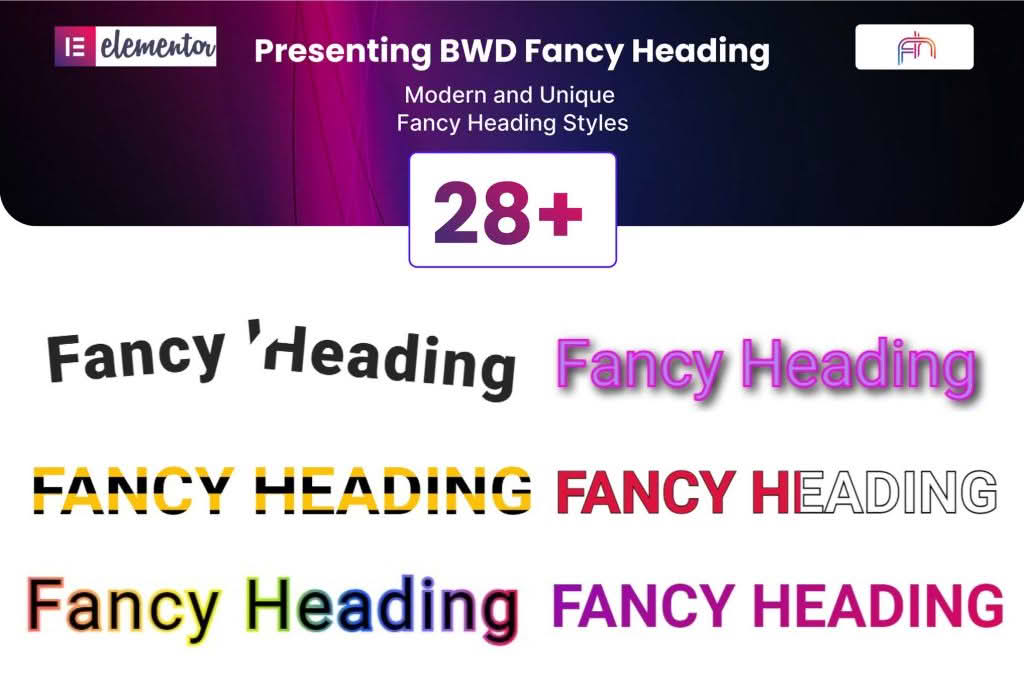
Elevate your website’s visual hierarchy and capture visitor attention instantly with the Fancy Heading addon for Elementor. Designed for web designers, marketers, and business owners who want to break away from standard, static typography, this plugin empowers you to create dynamic, eye-catching headlines without writing a single line of code. Whether you are aiming for a high-converting landing page, a creative portfolio, or a professional corporate site, this addon provides the tools to make your text pop, animate, and engage your audience effectively.
Key Features
- Dynamic Text Effects: Choose from a variety of animation styles, including typing effects, rotating text, flip animations, and slide-in transitions to bring your headers to life.
- Advanced Typography Controls: Gain granular control over your font family, weight, line height, letter spacing, and text transformation settings directly within the familiar Elementor interface.
- Gradient and Multi-Color Support: Move beyond solid colors by applying stunning linear or radial gradients to your text, helping your headlines match your brand identity perfectly.
- Responsive Design Settings: Ensure your fancy headings look perfect on every device with independent control over font sizes, alignment, and spacing for desktop, tablet, and mobile views.
- Interactive Hover States: Add depth to your user experience by configuring unique hover effects, such as color shifts, underline animations, or scaling, to encourage user interaction.
- Seamless Elementor Integration: Designed as a native Elementor widget, it works flawlessly with your existing workflow, allowing you to drag, drop, and customize with live previewing.
- Performance Optimized: Built with clean, lightweight code to ensure that your site remains fast and responsive, even when using complex text animations.
Use Cases / Who It’s For
The Fancy Heading addon is an essential tool for anyone looking to improve the aesthetic quality and engagement levels of their WordPress site. For marketing professionals, it is the perfect solution for creating high-impact hero sections that highlight unique value propositions through rotating or typing text, which can significantly increase visitor retention.
Web designers and freelancers will appreciate the ability to deliver premium, custom-feel websites to clients in a fraction of the time. Instead of relying on heavy custom scripts or complex CSS overrides, you can implement sophisticated design trends like gradient text or animated headlines in seconds. E-commerce store owners can use these tools to draw attention to limited-time offers, new product launches, or seasonal sales, ensuring that key messages are never missed by potential customers.
Setup / How It Works
- Installation: Install and activate the plugin through your WordPress dashboard just like any other plugin.
- Access the Widget: Open any page or template using the Elementor editor. Search for the “Fancy Heading” widget in the sidebar panel.
- Drag and Drop: Drag the widget onto your desired section or column.
- Configure Content: Use the content tab to input your text, select your preferred animation style, and set the timing or delay for the effects.
- Style Your Heading: Switch to the style tab to customize typography, colors, gradients, and padding to match your site’s design language.
- Preview and Publish: Use the live preview to see your changes in real-time, then click update to publish your new, engaging headline to the live site.
Similar Plugins
If you are exploring different ways to enhance your typography and headlines within Elementor, you may also consider exploring other popular addon suites such as Essential Addons for Elementor, JetElements, or Happy Addons. These collections often include their own versions of animated heading widgets, providing alternative animation styles and design options to help you achieve your specific creative vision.