
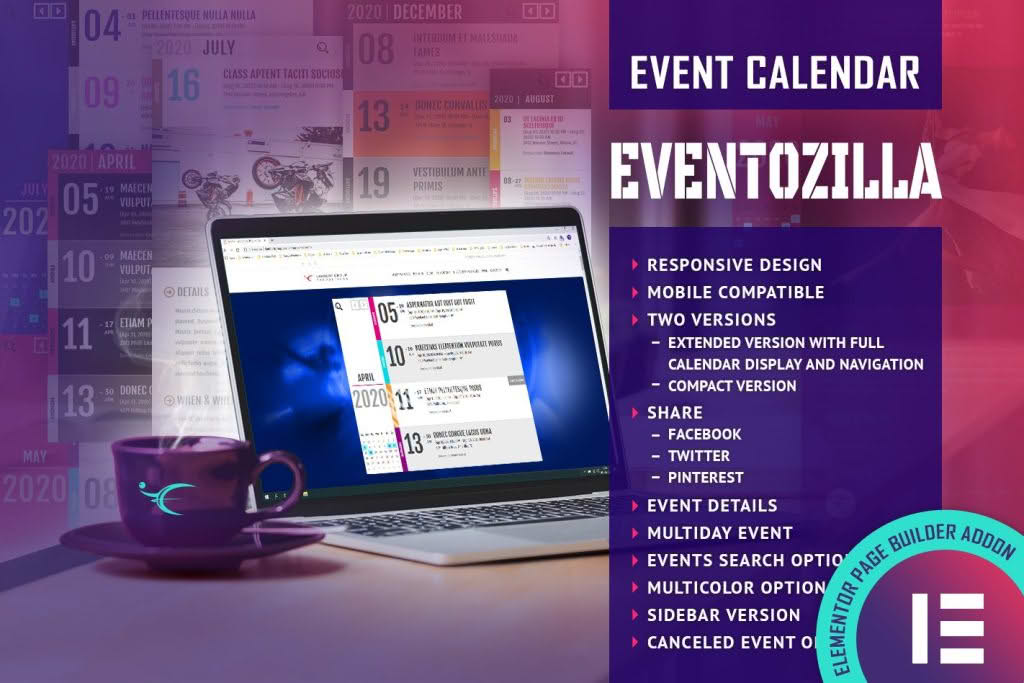
The EventoZilla Event Calendar Elementor Widget Addon is the essential bridge between your powerful event management system and your WordPress website’s visual design. If you are tired of struggling with rigid, unstyled event lists that clash with your site’s branding, this addon provides the design flexibility you need. By seamlessly integrating with Elementor, it empowers you to drag, drop, and customize stunning event calendars directly onto your pages, ensuring your audience stays informed while enjoying a cohesive, professional browsing experience.
Key Features
- Seamless Elementor Integration: Designed specifically for the Elementor page builder, allowing you to build complex event layouts using a familiar drag-and-drop interface without writing a single line of code.
- Fully Customizable Design: Take complete control over the look and feel of your event calendar. Adjust typography, colors, spacing, and borders to match your brand identity perfectly.
- Multiple Calendar Views: Offer your visitors the best way to browse events by switching between grid, list, or calendar view modes to suit different screen sizes and user preferences.
- Responsive and Mobile-Ready: Ensure your event calendar looks flawless on every device, from desktop monitors to smartphones, providing a consistent user experience for all your attendees.
- Advanced Filtering Options: Help your users find exactly what they are looking for with intuitive filtering capabilities, allowing them to sort events by category, date, or tags.
- Dynamic Event Content: Automatically pull and display event details such as titles, dates, times, locations, and featured images directly from your EventoZilla dashboard, keeping your site content always up-to-date.
- Customizable Event Cards: Design unique event card styles that highlight the most important information, helping to drive higher engagement and ticket sales.
Use Cases / Who It’s For
This addon is built for website owners, event organizers, and developers who prioritize both functionality and aesthetics. If you are managing a busy event schedule, you know that the way you present your events directly impacts attendance. This plugin is ideal for:
Event Organizers and Planners: If you host workshops, webinars, conferences, or local meetups, you need a calendar that reflects the professionalism of your events. This addon allows you to showcase your entire schedule in a way that encourages registrations.
Small Business Owners: Whether you run a yoga studio, a community center, or a boutique retail shop, keeping your customers informed about classes, sales, or special events is vital. This tool makes it easy to maintain an active calendar without needing a dedicated web developer.
Web Agencies and Freelancers: For professionals building sites for clients, this addon provides a reliable, easy-to-configure solution for adding event functionality to Elementor-based websites, saving you hours of custom development time while delivering a high-end result.
Setup / How It Works
Getting your event calendar up and running is designed to be a straightforward process that respects your time:
- Installation: Install and activate the EventoZilla Event Calendar Elementor Widget Addon plugin alongside your existing EventoZilla integration.
- Open Elementor: Navigate to the page or post where you want to display your events and open the Elementor editor.
- Drag and Drop: Locate the EventoZilla widget in the Elementor sidebar and drag it onto your canvas.
- Configure Settings: Use the widget settings panel to select your preferred calendar view, filter events, and define the number of events to display.
- Style Your Calendar: Navigate to the Style tab within the widget settings to customize fonts, colors, and layout spacing to match your website’s design.
- Publish: Once you are satisfied with the look and functionality, save your changes and publish the page to make your calendar live for your audience.