
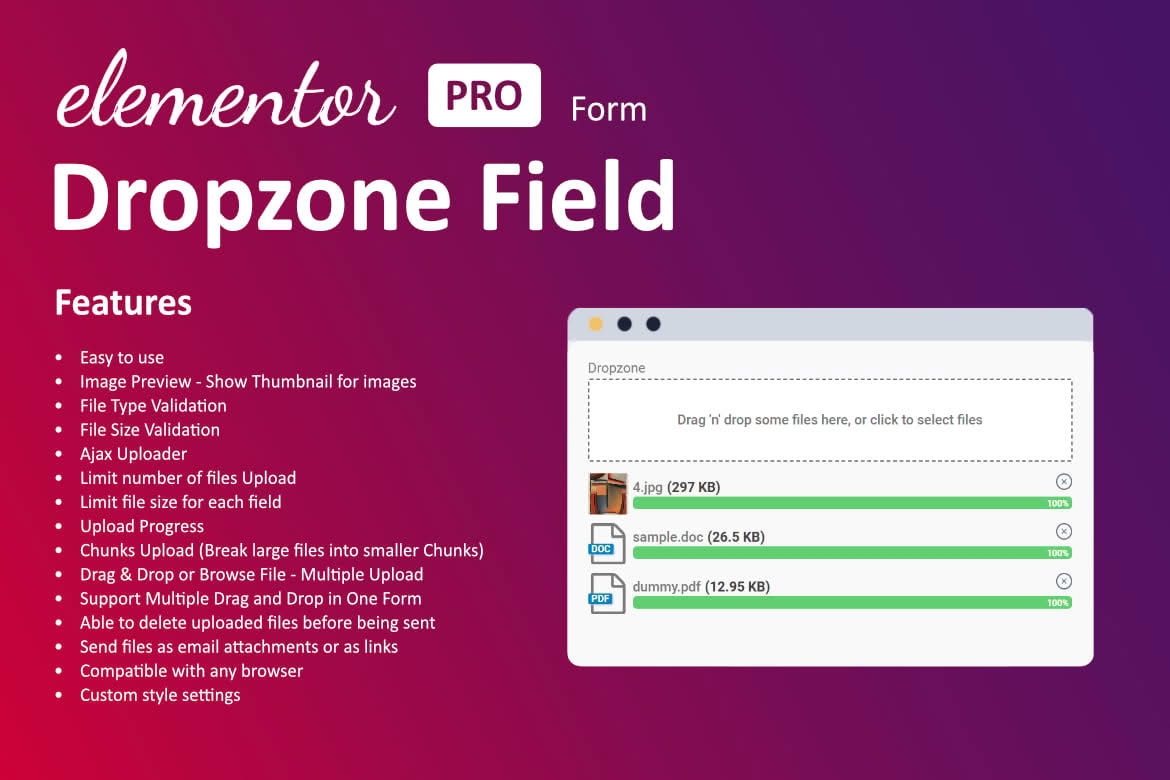
The Dropzone Field For Elementor Form plugin transforms the standard, often clunky file upload experience into a sleek, modern, and highly intuitive interaction for your website visitors. By integrating a drag-and-drop interface directly into your Elementor forms, you reduce friction, minimize user frustration, and ensure that your visitors can submit files—whether they are documents, images, or portfolios—without ever needing to navigate a cumbersome file selection window. This plugin is an essential upgrade for any business that relies on user-submitted content, providing a professional touch that boosts conversion rates and improves the overall quality of your forms.
Key Features
- Drag-and-Drop Functionality: Allows users to simply drag files from their computer directly into the form field, creating a seamless and modern user experience.
- Visual File Previews: Provides immediate visual feedback, allowing users to see exactly what they are uploading before they hit the submit button.
- Customizable File Restrictions: Easily set constraints on file types, maximum file sizes, and the total number of files allowed, ensuring you only receive the data you need.
- Progress Indicators: Displays real-time upload progress, which helps manage user expectations and prevents abandonment during larger file transfers.
- Elementor Integration: Designed specifically for the Elementor ecosystem, allowing you to drag and drop the field into your forms just like any other native Elementor widget.
- Responsive Design: Ensures that the dropzone interface functions perfectly on all devices, including mobile phones and tablets, where traditional file selection can be difficult.
- Styling Controls: Offers options to match the look and feel of the dropzone area to your existing brand identity and form design.
Use Cases and Who It’s For
This plugin is designed for any WordPress site owner who requires a professional way to collect files from their audience. If you are a web designer or agency, this tool is invaluable for client onboarding forms where you need to collect logos, brand assets, or project briefs. For photographers and creative professionals, it provides a simple way for clients to submit high-resolution images or project requirements without the need for third-party file-sharing services.
Furthermore, it is an excellent solution for educational platforms, job boards, or membership sites that require users to submit resumes, assignments, or supporting documentation. By simplifying the upload process, you significantly increase the likelihood that users will complete your forms, reducing the administrative burden of chasing down missing files or troubleshooting upload errors.
Setup and How It Works
Getting started with the Dropzone Field For Elementor Form is designed to be straightforward for both beginners and experienced developers:
- Installation: Install and activate the plugin through your WordPress dashboard as you would with any standard plugin.
- Form Integration: Open your desired page or template in the Elementor editor and locate the Elementor Form widget.
- Add Field: Add a new field to your form and select the custom ‘Dropzone’ field type from the available options.
- Configure Settings: Use the settings panel to define your allowed file extensions (e.g., .jpg, .pdf, .docx), set the maximum file size limit, and customize the visual appearance of the dropzone area.
- Publish: Save your changes and preview your form to ensure the drag-and-drop zone is functioning exactly as intended.
Similar Plugins
While there are various ways to handle file uploads in WordPress, alternatives often include:
- Elementor Pro Form File Upload: The native file upload feature included with Elementor Pro, which provides basic functionality but lacks the advanced visual drag-and-drop interface of a dedicated dropzone plugin.
- WPForms File Upload: A popular form builder plugin that includes its own file upload field, often used by those who prefer the WPForms ecosystem over the native Elementor form builder.
- Contact Form 7 with File Upload Add-ons: Various third-party extensions exist to add file upload capabilities to the Contact Form 7 plugin, though these often require more manual configuration and custom coding to achieve a modern dropzone look.