
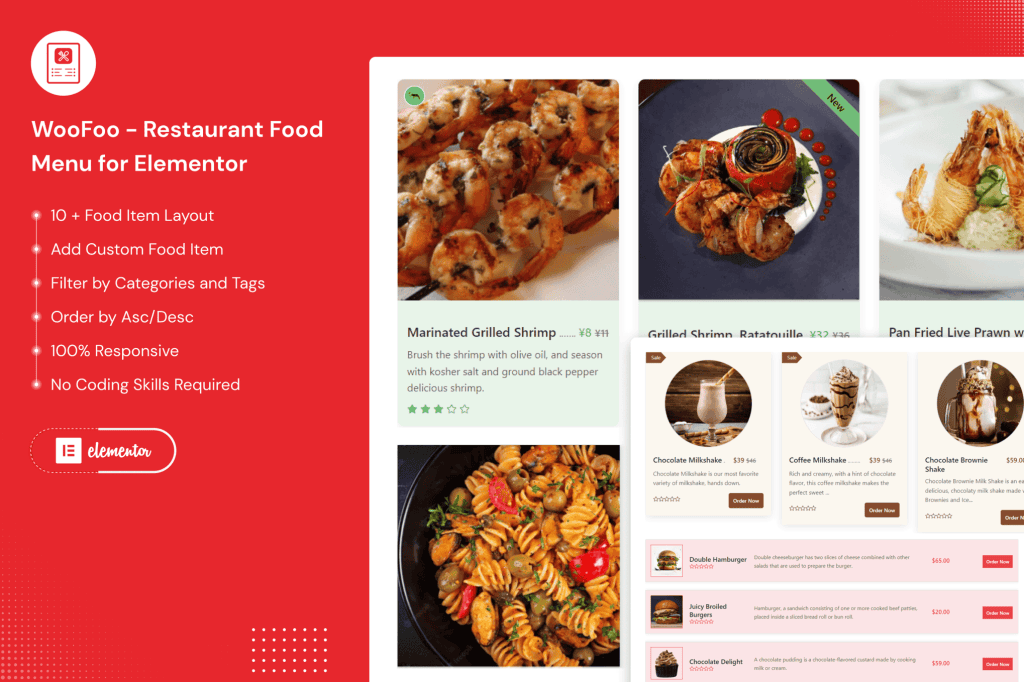
Transform your restaurant’s online presence with WooFoo, the ultimate food menu builder designed specifically for Elementor. If you are a restaurant owner, cafe manager, or food service provider, you know that your menu is your most important sales tool. WooFoo bridges the gap between a static PDF menu and a fully interactive, conversion-focused digital experience. By integrating directly into the Elementor page builder, this plugin empowers you to create mouth-watering, responsive, and easy-to-navigate menus that look great on any device, helping your customers decide what to order faster.
Key Features
- Seamless Elementor Integration: Build, customize, and style your menus using the familiar Elementor interface. Simply drag and drop widgets to create stunning layouts without writing a single line of code.
- Responsive Design: Ensure your menu looks perfect on desktops, tablets, and mobile phones. WooFoo menus automatically adapt to screen sizes, ensuring your customers have a smooth browsing experience on the go.
- Customizable Menu Layouts: Choose from various pre-designed templates or create your own custom look to match your restaurant‚Äôs branding. Adjust fonts, colors, spacing, and images to perfectly reflect your establishment’s personality.
- Categorization and Filtering: Keep your menu organized with intuitive categories like Appetizers, Main Courses, Desserts, and Drinks. Help your customers find exactly what they are craving with easy-to-use filtering options.
- High-Quality Image Support: Showcase your culinary creations with high-resolution image galleries. Visuals drive appetite, and WooFoo makes it easy to associate appetizing photos with every item on your menu.
- Dietary Information Badges: Clearly label items for dietary preferences, such as Vegetarian, Vegan, Gluten-Free, or Spicy. This builds trust with your customers and helps them make informed choices quickly.
- Fast Loading Performance: Built with performance in mind, WooFoo ensures your menu loads quickly, preventing potential diners from bouncing due to slow-loading pages.
Use Cases / Who It’s For
WooFoo is engineered for anyone in the food and beverage industry who relies on a WordPress website to attract diners. Whether you are running a cozy local coffee shop, a high-end fine dining restaurant, a bustling food truck, or a catering business, this plugin provides the professional tools needed to showcase your offerings effectively.
It is particularly beneficial for businesses that frequently update their seasonal specials or daily menus. Because it integrates with Elementor, staff members can make quick updates to prices, descriptions, or availability without needing developer assistance. If you are a web designer or agency building sites for restaurant clients, WooFoo serves as a reliable, time-saving solution that allows you to deliver high-quality, editable menu systems that your clients will love to manage.
Setup / How It Works
Getting your menu live with WooFoo is a straightforward process designed to get you up and running in minutes:
- Install and Activate: Install the WooFoo plugin via your WordPress dashboard and activate it.
- Create Menu Items: Navigate to the WooFoo menu section in your dashboard to add your dishes, including descriptions, prices, images, and dietary tags.
- Drag and Drop Widgets: Open any page or template in Elementor. Locate the WooFoo widgets in the sidebar and drag them onto your canvas.
- Customize Styles: Use the Elementor style tabs to adjust fonts, colors, and layout settings to match your brand’s aesthetic.
- Publish: Once you are satisfied with the look and feel, publish your page to provide your customers with a beautiful, interactive digital menu.
Similar Plugins
While WooFoo offers a specialized experience for Elementor users, there are other solutions in the WordPress ecosystem for managing restaurant menus, such as Five Star Restaurant Menu, Food Menu by PickPlugins, and Restaurant Menu by MotoPress. Each of these offers different approaches to menu management, but WooFoo stands out for its deep, native integration with the Elementor page builder workflow.