
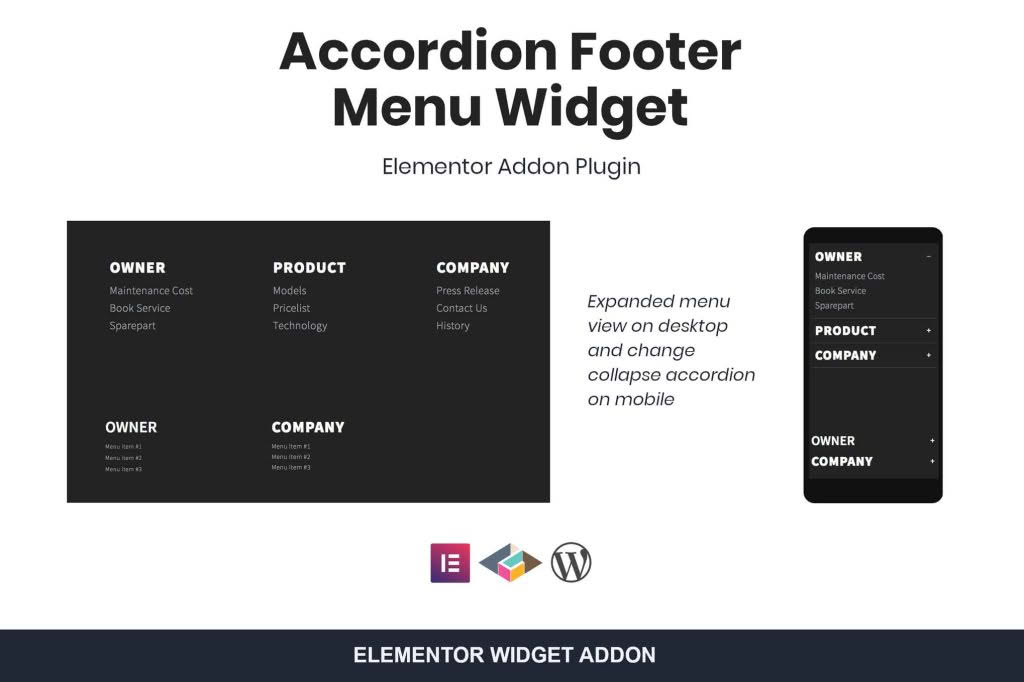
Transform your website’s footer from a cluttered, overwhelming list of links into a clean, space-saving, and user-friendly navigation hub. The Accordion Footer Menu Widget for Elementor is designed for site owners who want to maintain a professional aesthetic without sacrificing accessibility. By converting standard WordPress menus into interactive, collapsible accordion sections, this plugin helps you organize extensive site structures, improve mobile usability, and keep your footer design sleek and modern.
Key Features
- Seamless Elementor Integration: Designed specifically as an Elementor widget, allowing you to drag, drop, and style your footer menus directly within the familiar Elementor editor interface.
- Collapsible Accordion Functionality: Automatically transforms standard WordPress menus into accordion-style lists, saving valuable vertical screen space while keeping all links easily accessible.
- Mobile-First Design: Enhances the mobile user experience by preventing long, scrolling footers that frustrate users on smaller screens.
- Customizable Trigger Icons: Choose from various icons to indicate the expansion state of your menus, providing intuitive visual cues for your visitors.
- Responsive Controls: Fine-tune how your accordion behaves across different devices, including options to keep menus expanded on desktop while collapsing them on mobile.
- Styling Flexibility: Control typography, colors, spacing, and border settings to ensure your footer menu perfectly matches your brand identity.
- Performance Optimized: Built with clean, lightweight code to ensure that your site remains fast and responsive, regardless of how many menu items you include.
Use Cases / Who It’s For
This plugin is the ideal solution for website owners, designers, and developers who manage content-heavy websites. If you run an e-commerce store with dozens of categories, a news portal with extensive sections, or a corporate site with complex legal and support information, your footer can quickly become a “link graveyard.”
For e-commerce store owners, it allows you to group products, customer service links, and company policies into neat, clickable headers. This keeps the initial footer view clean, allowing customers to find exactly what they need without scrolling past excessive text. For designers, it provides a sophisticated way to handle navigation without compromising the visual hierarchy of the page layout. Whether you are building a personal blog or a large-scale business platform, this widget helps you maintain a professional, organized, and high-converting footer area.
Setup / How It Works
- Install and Activate: Upload the plugin to your WordPress site and activate it through the plugins dashboard.
- Access Elementor: Open any page or template (such as your Footer Template) in the Elementor editor.
- Locate the Widget: Search for the “Accordion Footer Menu” widget in the Elementor panel on the left.
- Drag and Drop: Drag the widget into the desired column within your footer section.
- Select Menu: In the widget settings, select the specific WordPress menu you wish to display from the dropdown list.
- Configure and Style: Use the Content and Style tabs to adjust the accordion behavior, choose your icons, and customize fonts and colors to match your site’s aesthetic.
- Save and Publish: Once you are satisfied with the look and functionality, save your changes to update your site’s footer immediately.
Similar Plugins
If you are exploring alternatives, you may encounter other tools such as the “Essential Addons for Elementor” or “Premium Addons for Elementor.” These are comprehensive suites that include accordion and menu widgets among many other features. However, if you are looking for a dedicated, lightweight solution focused specifically on optimizing footer navigation without the overhead of a large plugin suite, the Accordion Footer Menu Widget for Elementor remains a specialized and efficient choice.