
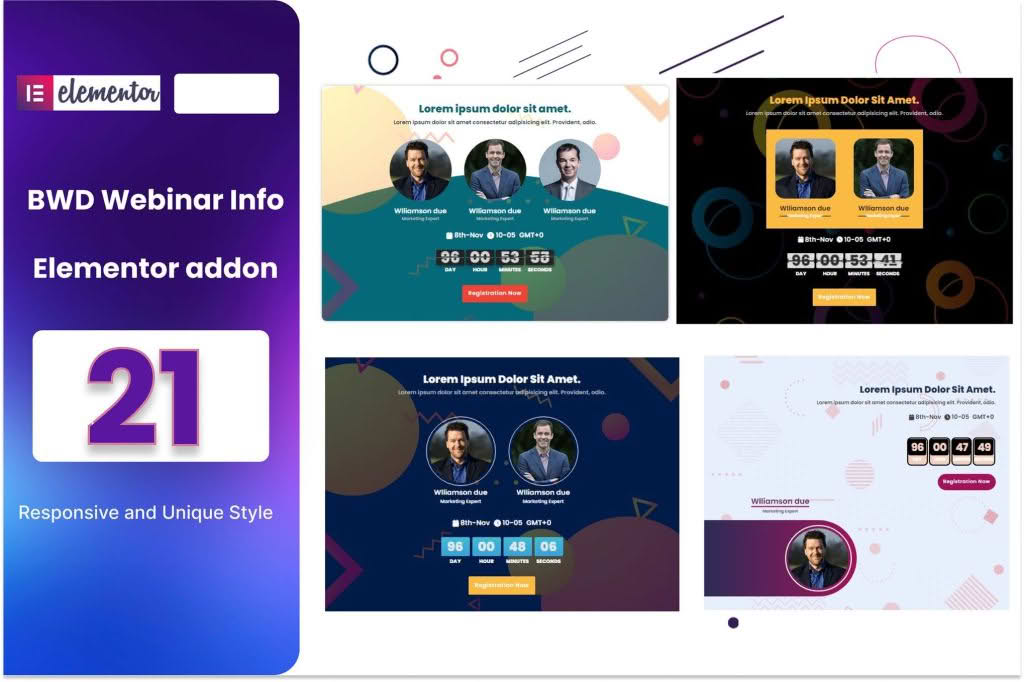
Transform your website into a high-converting event hub with the Event Webinar Info Plugin for Elementor. Designed specifically for users who rely on the Elementor page builder, this plugin bridges the gap between static event information and dynamic, engaging user experiences. Whether you are hosting live webinars, workshops, or virtual conferences, this tool empowers you to display crucial event details, countdowns, and registration calls-to-action with professional precision, ensuring your audience never misses an important date.
Key Features
- Elementor Native Integration: Build your event pages using the familiar drag-and-drop interface you already love. No coding knowledge is required to create stunning, responsive layouts.
- Dynamic Countdown Timers: Create urgency and anticipation by displaying real-time countdowns to your webinar start time, helping to boost registration rates and attendance.
- Customizable Event Info Widgets: Easily display essential data such as date, time, speaker bios, and session agendas in clean, professional layouts that match your brand identity.
- One-Click Registration Links: Seamlessly integrate registration buttons that connect directly to your webinar platform or email marketing service, streamlining the user journey from landing page to sign-up.
- Responsive Design: Ensure your event information looks perfect on every device, from desktop computers to smartphones, providing a consistent experience for all your attendees.
- Speaker Profile Displays: Highlight your experts with dedicated sections for headshots, names, titles, and social media links to build credibility and authority for your events.
Use Cases / Who It’s For
This plugin is the ideal solution for digital marketers, course creators, and business owners who need a streamlined way to manage event promotion. If you are a coach looking to host monthly masterclasses, a business owner launching a new product via webinar, or an educational organization scheduling virtual workshops, this tool simplifies the technical side of event management.
By using this plugin, you stop wasting time struggling with complex shortcodes or incompatible themes. Instead, you gain the ability to quickly spin up professional event pages that look consistent with the rest of your site. It is perfect for teams that need to update event details frequently without needing to involve a developer, allowing you to focus on delivering great content rather than managing website code.
Setup / How It Works
- Install and Activate: Upload the plugin zip file to your WordPress dashboard, activate it, and ensure you have the Elementor page builder installed.
- Open Elementor Editor: Navigate to the page or post where you want to display your event information and launch the Elementor editor.
- Drag and Drop Widgets: Locate the new Event Webinar widgets in your Elementor sidebar. Simply drag your chosen widget onto the page canvas.
- Configure Settings: Use the intuitive settings panel to input your event date, time, speaker details, and link your registration URL.
- Style to Perfection: Use the standard Elementor style tabs to adjust colors, typography, spacing, and borders to ensure the event section perfectly matches your website’s design.
- Publish: Once you are satisfied with the look and feel, update or publish your page to make your webinar information live for your audience.
Similar Plugins
While there are various ways to display event data, users looking for similar functionality often explore dedicated event management solutions such as The Events Calendar, EventON, or various Elementor-specific add-on packs that include event countdown and info widgets. The Event Webinar Info Plugin for Elementor stands out by focusing specifically on the needs of webinar hosts who prioritize a lightweight, streamlined workflow within the Elementor ecosystem.