
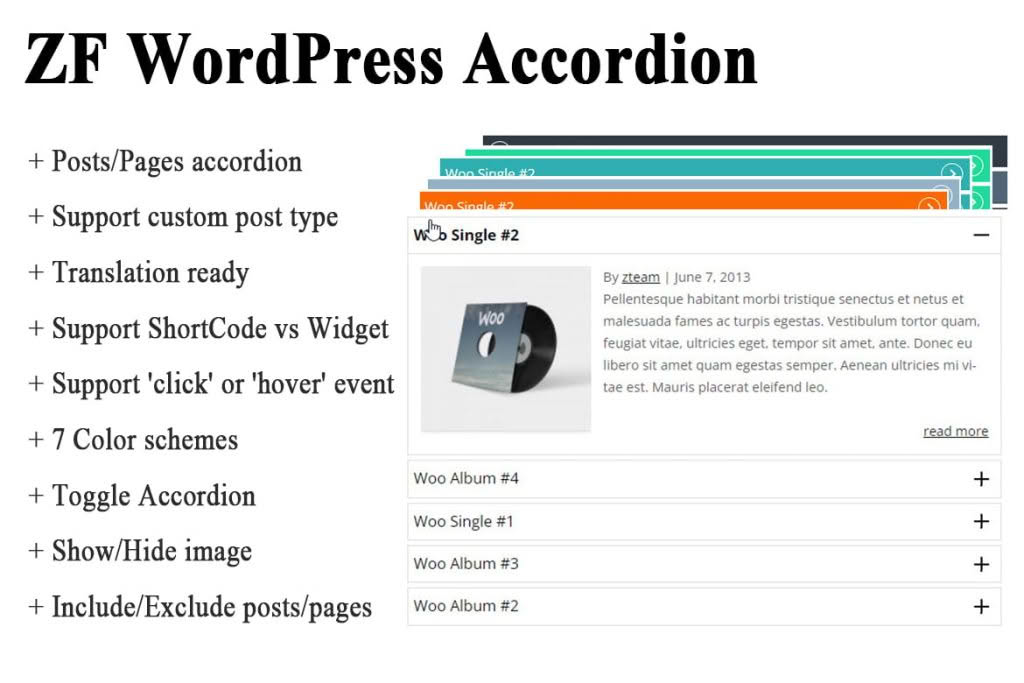
The ZF WordPress Accordion plugin is a versatile tool designed to help you organize content efficiently and improve user navigation on your website. Whether you are managing a large WooCommerce store, a content-heavy blog, or a complex knowledge base, this plugin allows you to present categories, pages, and custom post types in a clean, space-saving accordion format. By transforming long, cluttered lists into interactive, collapsible menus, you can create a more intuitive browsing experience that keeps your visitors engaged and helps them find exactly what they are looking for.
Key Features
- Broad Compatibility: Seamlessly display WooCommerce product categories, standard WordPress categories, pages, and any custom post types in an accordion layout.
- Flexible Display Options: Easily implement your accordions using either a shortcode or a dedicated widget, giving you the freedom to place them in sidebars, footers, or directly within your page and post content.
- Customizable Styling: Choose from 7 built-in color schemes to match your brand identity, with the ability to add your own custom colors for a tailored look.
- Interactive User Experience: Support for both ‘click’ and ‘hover’ trigger events, allowing you to control how users interact with your menus.
- Advanced Configuration: Fine-tune the behavior of your accordions with options to toggle items, align arrows (left or right), and adjust the animation speed for expanding or collapsing content.
- Smart Navigation: Features like highlighting the current category while viewing a single post, expanding the first-level child of an active category, and opening default parent categories help users maintain their place on your site.
- Content Control: Manage exactly what your users see by including or excluding specific categories/pages, hiding empty categories, and limiting the total number of items displayed.
- Translation Ready: Built with localization in mind, making it easier to adapt the plugin to your site’s language.
Use Cases / Who It’s For
This plugin is an essential asset for any website owner looking to optimize their information architecture. E-commerce store owners will find it particularly useful for organizing extensive product catalogs, allowing customers to navigate through nested categories without being overwhelmed by a massive menu. For bloggers and site administrators, it is an excellent solution for creating FAQ sections, knowledge bases, or structured documentation where users need to quickly expand and collapse specific topics. If your site has a deep hierarchy of pages or posts, ZF WordPress Accordion helps you maintain a clean, professional aesthetic while keeping your content easily accessible.
Setup / How It Works
Getting started with ZF WordPress Accordion is straightforward and designed to integrate smoothly into your existing workflow:
- Installation: Upload and activate the plugin through your WordPress dashboard.
- Configuration: Navigate to the plugin settings to select your preferred color scheme, define your interaction preferences (click vs. hover), and set your desired animation speeds.
- Implementation:
- For Widgets: Go to Appearance > Widgets and drag the ZF Accordion widget into your desired sidebar or widget area.
- For Pages/Posts: Use the provided shortcode to insert your accordion directly into the content area of any post or page.
- Customization: Use the include/exclude settings to refine which categories or pages are displayed, ensuring your accordion perfectly matches the needs of that specific page or section.